Personal agents and OpenClaw
Trying to get a team of agents to remember what I told them and finish the work. Giving them names was the easy part.
 Human For Now
Malcolm Graham / learning AI in public
I’m Malcolm Graham. I’m building things with AI to find out what it can actually do, what it gets wrong, and how much of my life I’m willing to hand over to it. So far, that includes a team of agents and a video game starring my dachshund. I have questions about where all this is going. In the meantime, the dog has a game.
Free experimental AI guide
Ask General Ruben about the projects, ideas, and writing on this website. Text, optional voice, and direct section links help you find your way.
Ask Ruben about this site → · Use the section guide →
Questions, replies, and source clicks are recorded for owner analytics after you accept the recording notice. This is a free public experiment, with bounded sessions and usage. AI answers can be wrong; check the linked content.
Currently
 Published September 10 / updated September 29
Ruben now has twenty chapters: a trip up the coast, a concert, Yellowstone, and five chapters on the long road home. Scruffer takes the lead along the way. You can turn the sound off before starting, and puzzle progress survives a break. The next question is whether someone who didn’t build it can figure out what the hell to do.
Play it. Tell me where you get stuck.Trying to get a team of agents to remember what I told them and finish the work. Giving them names was the easy part.
When I find a site or tool that does something well, I want to know how it works and whether I can build something useful from the idea.
MIT coursework / AI leadership and adoption
My MIT coursework pushed me to connect the technology with the people, decisions, and culture around it. I’ve put the general lessons and a six-step learning path here, while keeping the company capstone private.
Follow the learning path → · See current application status →
Notes
Who does what, what currently works, and what I’m still trying to get right.
I wanted my scattered information in one useful agenda. Getting it onto a phone raised some questions about what should ever leave my computer.
What an agent should be allowed to read, change, and publish, and how to recover when something goes wrong.
OpenClaw / agents
I want agents that can take a job and carry it through without making me explain the same thing every time. I also want to know what they can access and what they’re doing with it. A confident answer is easy to get. A finished job takes more checking.
Pancho coordinates the work. Doozer builds, Einstein researches, Patton handles operations, Leonardo looks at design, and Rosco checks security. Mo reviews accessibility. Thoreau is supposed to catch the moment the writing stops sounding like me. There are eight named roles across nine configured entries because the default entry also uses Pancho’s identity. This is the setup as checked on September 13, not a live view of what they’re doing.
Platform: OpenClaw and its Codex plugin moved from the June stack to 2026.9.4, through an intermediate 2026.6.35 smoke test. Node is now 26.8.2.
Execution: the Codex authentication problem was fixed, and a real agent request got a reply through ChatGPT/OAuth. The OpenAI API-key fallback was removed.
Routing: explicit Telegram ownership was added during the migration. Gateway and Telegram passed fresh probes on September 13; the upgrade’s deterministic agent reply test also passed.
State: the upgrade migrated configuration, shared SQLite state, agent databases, and existing transcripts. Historical task records remain distinct from current health.
These are the jobs I’ve assigned. Separate roles should make the work easier to check; otherwise I’ve just created more people to manage, minus the people.
Keeps track of the job, assigns the work, and brings decisions back to me.
Builds the requested change and tells me what changed. A small fix should stay a small fix.
Finds the evidence, checks competing explanations, and tells me what the sources actually support.
Looks after deployment, recovery instructions, and the maintenance that makes tomorrow’s work possible.
Checks whether the design makes sense on a phone, whether you can read it, and whether the buttons are usable.
Checks code, dependencies, credentials, and what might be exposed. I want the problem found before somebody else finds it.
Looks for the barriers that keep people from using what I’ve built. Access should be part of the design.
Checks whether the writing carries my meaning and sounds like something I’d say. Currently assigned GPT-5.6 Luna.
Nine configured entries, eight named roles, seven specialists. The default main entry and the separate pancho entry share Pancho’s identity; Telegram routes to main. Agent-to-agent access is enabled for the default entry and seven specialists. Configuration does not prove that every handoff has been tested.
This update comes from the actual configuration, installed plugins, health checks, and upgrade record. A feature appearing in a menu doesn’t tell me whether it works.
GPT-5.5 remains the default for main, Pancho, and six specialists. Thoreau uses GPT-5.6 Luna, which is also registered across the other entries. GPT-5.4 mini and several Claude models remain in the catalog; a catalog entry is not a tested fallback. No automatic default fallback is configured.
Codex, OpenAI, Telegram, browser, Canvas, and core memory plugins are enabled. The Codex reply path and Telegram transport have working test evidence. The September 13 setup record reported the local OpenClaw node service installed and running, with node pairing completed. Host Desktop was still unavailable in that record, pending macOS Screen Sharing. Browser and Canvas enablement alone does not establish end-to-end readiness. Active Memory and the experimental CUA Computer plugin are disabled.
The 2026.9.4 release adds improved plugin and skill discovery, conversation-to-skill creation, GPT Image 2.5 support, cloud-session controls, and terminal questions. These are release capabilities to evaluate; this review did not test their use in this setup.
The next test is one small job carried through a specialist, Mo’s accessibility review, and Thoreau’s voice check. Record what each contributed and whether the result improved. Memory retrieval and a full backup restore also need testing; the upgrade still reported memory alignment and backup housekeeping issues.
Configuration rechecked : OpenClaw 2026.9.4, Node 26.8.2, nine agent entries and the model assignments above. The successful reply, Gateway, Telegram and authentication checks belong to the September 13 record; they were not rerun for this content review. Enabled integrations and named roles are not proof of current end-to-end operation. Private prompts, credentials, messages, and account details are not part of this report.
Field guide / security
The more useful an agent gets, the more of my information it wants. Before I connect another account, I want to know what the job actually requires, what the agent can change, and how I can take that access away. Convenience is a poor reason to stop asking.
OWASP’s GenAI LLM Top 10 now has a 2026 edition; the original project page is an archive. NIST’s published AI RMF 1.0 remains available while a revision is underway, with a 2026 critical-infrastructure profile concept note. OWASP and NIST were rechecked September 29, 2026. CISA’s Secure by Design link is retained as a reference; its page could not be retrieved during this review.
Files, memory, and notes stay in the private workspace first.
Tools run with least authority and narrow task context.
Risky, public, costly, or account-level actions require review.
Tests, diffs, and audit checks happen before public deployment.
Only approved and verified changes leave the private workspace.
Store preferences and working notes where they belong. Before publishing, check for private messages, credentials, and other people’s information. A useful example does not need to contain somebody’s actual life.
Use existing sign-ins, a password manager, short-lived tokens, and permissions limited to the service and task. Keep raw passwords out of chat.
Permission to read something does not include permission to send it. Be explicit about spending, account changes, messages, and publishing. Reading and local edits still need care when private information is involved.
Read the changes, run the relevant tests, check for secrets, and open it on a phone. After publishing, check the actual site. A successful deployment message doesn’t tell you whether the page makes sense.
In place: local workspace memory, Pancho as coordinator, specialist handoffs, explicit cost limits, and conservative rules for external actions.
Still needs work: long-term memory curation should be kept current so old preferences do not drift away from how the system actually works.
Scale: I need controls I can understand and maintain. More paperwork would not make this system safer by itself.
Field notes / tools
The application index includes the latest private builds and development work. Here are the public projects and tools. Some answer a fairly ordinary question. One puts my dachshund in charge of a dragon problem. Each has a link so you can see what it actually does.
I made a game for my wife and put Ruben in charge. Twenty chapters of sniffing, digging, dragons, and a journey home with the whole family. The Long Road Home release is playable now.
Play + project storyA visual map of Pancho, specialist agents, memory, permissions, and safe automation inside this OpenClaw workspace.
Live noteAdd up the hardware, subscriptions, connectors, and things you forgot you’d have to pay for. Change the numbers to match your setup.
Live toolWhat an agent should be allowed to read, change, and publish, and how to recover when something goes wrong.
Live guideA look at surveys and routed model traffic, with the dates and limits attached. Popularity is not a test result.
Live noteLooks for patterns in text and images inside your browser. It cannot prove that AI made something, however convincing the number looks.
Live toolA few questions about the work, the data, and who is responsible when it breaks. Your answers become a short plan you can edit.
Live toolRecurring jobs that might be worth automating, with the inputs and limits spelled out.
Live guideHow I tried to turn scattered information into an iPhone agenda, including the privacy problem caught before release.
Live storyLab notebook
Updated October 2, 2026 — application status, MIT learning notes, and the latest game graphics release. Model traffic remains the dated September 28 snapshot.
The record of what reached the site. Dates matter here: a working build in July does not tell you what works today.
Added an application index with public, private, and development status, including Ask Ruben’s accepted owner-only MVP. The new learning section follows my MIT AI leadership coursework and capstone revision process without publishing company specifics. Boobs’ Journey has twenty chapters and today’s graphics and cinema updates.
The game summaries now match the fifteen-chapter September 26 release. OpenRouter traffic is refreshed through September 28, agent configuration is rechecked, and the writing collection keeps its original posts. Survey years and untested capabilities stay visible. A new review date does not turn old evidence into a new result.
Replaced the nearly black section backgrounds with blue and teal, added new geometric artwork, replaced the empty project grids, and gave the diagrams and tools more contrast. The site needed to look different without changing what it does.
Added blue and green accents, clearer geometry, and a look at Ruben’s world on the homepage. Fixed the game menu so it scrolls through all thirteen chapters, including the first three that were missing from the shortcuts. Existing saves still work.
Rewrote the personal copy, project notes, and tool explanations. Less distance, fewer slogans, more of the actual reasons I’m doing this. Also fixed the plan builder printing backslash characters instead of proper line breaks.
The game now reaches the coast and concert finale, with a silent-play option and persistent puzzle checkpoints. Homepage and article summaries now match the released build. I added a link to my LinkedIn writing on AI safety and surveillance.
Added the OpenClaw 2026.9.4 upgrade, the authentication and Telegram repairs, and the full agent roster. The page now says which features are configured and which have actually been tested. See the progress and next tests.
Refreshed the OpenRouter snapshot, clarified survey periods, updated the security references and agent roster, and separated archived project milestones from current release claims.
Ruben’s six-chapter browser adventure now has a public home, a project story, and a plan for playtesting, clearer controls, and deeper exploration. Read the article and play the game.
Moved the site to Human For Now. The tools and project stories came with it, and mjgivai.com still works.
Published the July Daily Agenda build story: getting Health and Messages connected, reaching TestFlight, and catching private data in a demo bundle before the next release.
Local site review now starts with a phone-accessible preview URL, not a desktop-only localhost link, because mobile is the first review surface for new MJGIVAI website material.
Added examples of recurring jobs worth considering, what each needs, and what a first version would produce.
Added the browser-only scorecard and short plan builder. The questions are about the work and who owns it, before anybody buys more software.
Production Turnstile uses the real domain widget, admin pages are kept out of crawler paths, and smoke-test comments were removed from the moderation queue.
Added the agent names and their jobs so the setup is easier to understand.
The calculator turns a personal-agent setup into editable one-time and monthly costs, then invites moderated discussion.
Daily Agenda / July 2026
My information was spread across email, meetings, notes, conversations, and health data. I wanted an agenda that could make sense of it. That also meant deciding how much personal information an app needed and what should stay on my computer.
The recorded July build is 0.2.0 (13): a SwiftUI dashboard, Apple Health sync, Messages and Outlook connections, and a pipeline running locally. That is the milestone documented here. A newer build or current TestFlight availability has not been verified.
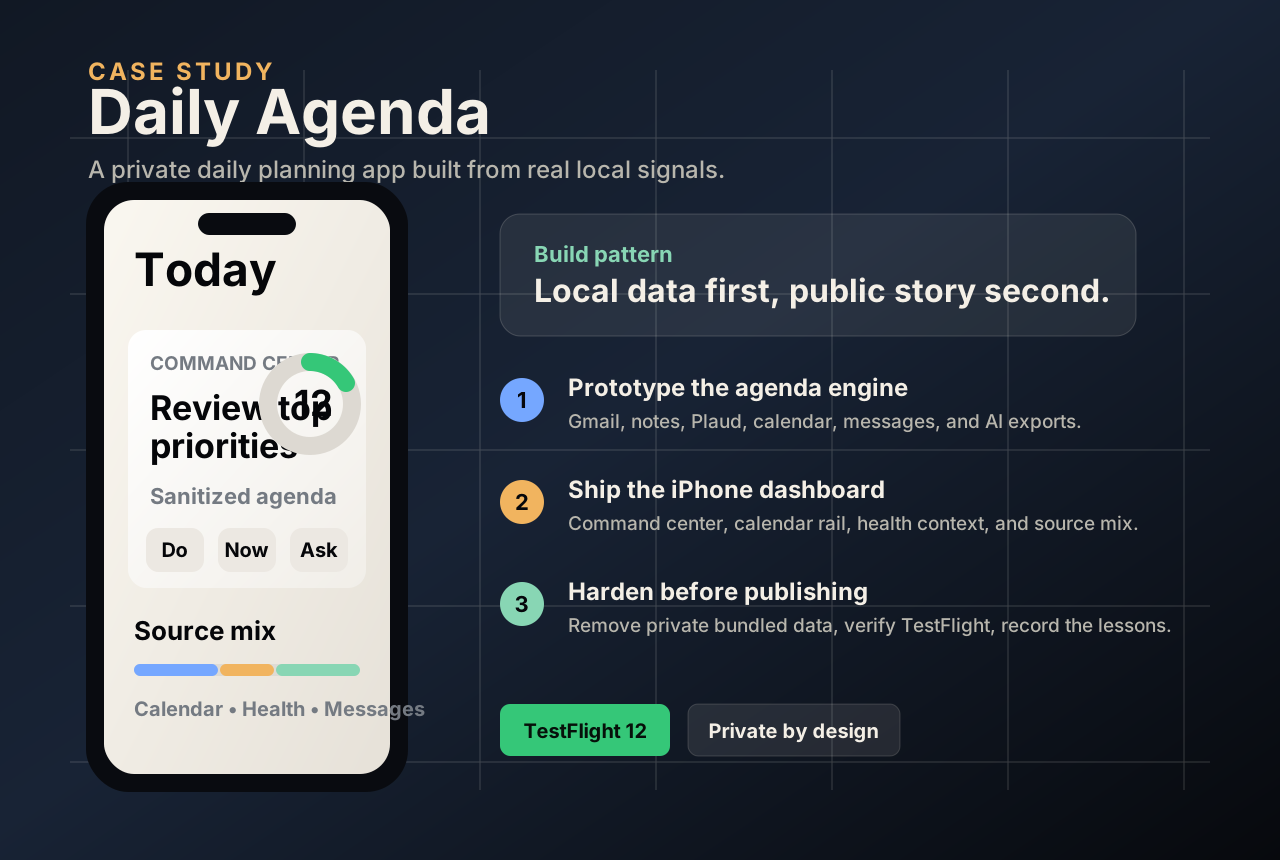
Early TestFlight work exposed a demo shell where the production dashboard should have been. We replaced it with the real ContentView, then made archive and simulator checks part of the release habit.
HealthKit can return no data for a valid day. The fix was to treat no-data responses as zero, persist the last aggregate snapshot, and keep refresh behavior honest.
Full Disk Access and assistive permissions had to be handled before the pipeline could use local Messages context. The documented ingest failed softly instead of breaking the whole agenda.
The app briefly bundled a generated agenda snapshot with real personal context. The security review caught it, the resource was removed, and the next version shipped without private bundled data.
Usage signals / not a census
I wanted a better answer than whatever model is being shouted about this week. These are three different views: the Stack Overflow survey index checked September 29, an older AI-builder survey, and OpenRouter traffic through September 28, 2026. They measure different things. None is a census of everyone using AI.
These are separate survey measures, not slices of a whole. The first covers respondents; the second covers professional developers. Stack Overflow still lists 2025 as its latest published results when checked September 29, 2026.
Source: Stack Overflow 2025 AI surveyArtificial Analysis, H1 2025: 591 respondents to the model-family question. Multiple selections were allowed. Retained from the September 11 review of the original report. On September 29 the PDF could not be retrieved and a newer comparable edition was not located; these values have not been independently revalidated in this refresh. These figures are historical consideration, not current production volume.
Source: OpenRouter, usage data through September 28, 2026, captured September 29; “This Week,” all models. Prompt and completion tokens, including reasoning; private traffic excluded. Model variants rank separately. Licensed under CC BY 4.0. This is a saved snapshot, not a live feed.
A survey response, a model someone considered, and a billion routed tokens are different measurements. Adding them together would give us a very confident piece of bullshit. Higher traffic does not establish better answers, more users, or lower cost. The source links are there so you can check the numbers and find newer data.
Client-side tool
Before adding AI to a job, explain the job. These questions cover the work, the data, and who will check the result. They produce a rough score and a short plan in your browser. There’s no account or API call, and a high score is not a guarantee that the idea is any good.
Choose one job and say who owns it, what improvement would count, who checks the result, and when to stop. If those answers are vague, the experiment is still vague.
Interactive note
Add up the setup bill and monthly costs. Every number is editable. Calculator assumptions reviewed September 29, 2026; they are not vendor quotes and exclude taxes and domain renewals after year one. MCP connectors are optional, and this calculator does not use them. Read the explanation on the standalone calculator page.
One-time setup
Monthly run-rate
Project / local analysis
This looks at repetition and sentence patterns in text, or metadata and pixel patterns in an image. It runs here in your browser; your sample is not uploaded. Those clues can be misleading. A person can sound like a machine, and a machine can sound like a person. This tool cannot settle an argument about who made something.
Use it to inspect patterns, not accuse somebody. The score is not proof.
Local results will appear here.
No server request is made for analysis.
The browser does the work with ordinary JavaScript.
Use the score as a lead, not a final judgment.
Writing / AI, surveillance & dignity
I write about what happens when technology’s idea of “safety” collides with the privacy of the person living with it. Here’s the archived article and four posts behind that conversation. Collection reviewed September 29, 2026; follow LinkedIn for newer writing.
My LinkedIn profile ↗“Solve the specific problem a person has consented to solve using the least invasive technology reasonably capable of solving it.”
From license plate readers in Volusia County to cameras in residents’ bedrooms: where does useful technology cross the line?
These aren't gotchas. They're the questions every operator should be asking every vendor in this category, including mine.
Worth saying plainly: this was a lab study. Roughly 50 university students. A single session. Nobody has run this on an 84-year-old in a memory care room.
A resident moving into senior living shouldn't have to trade privacy and dignity for safety. And operators shouldn't have to choose between being innovative and being creepy.
About / contact
I like making things, figuring out how they work, and asking questions that don’t always make the sales presentation better. This site is where I’m working through AI by using it. Some projects are useful. Some are personal. I’m willing to be wrong, but I want to understand why, and I don’t want the machine polishing the opinion out of everything I say.
Site data note: page visits and interactions may be recorded by site usage telemetry. Calculator inputs, readiness answers and Origin Lab samples are processed in your browser. Discussion submissions go to the moderation service.